
Printer cleaning method (80mm thermal receipt)
The thermal printer is an important component in the cash register system. In most cases, the cash drawer is connected to the printer.
1. Cleaning of 80mm thermal receipt printer
1. Clean the print head
The printhead should be cleaned when the printer experiences one of the following conditions:
(1) The printing is not clear;
(2) The longitudinal column of the printed page is not clear;
(3) The paper feeding noise is large.
The steps for cleaning the print head are as follows:
(1) Turn off the power of the printer, open the top cover, and remove the paper if there is paper;
(2) If you just finished printing, you should wait for the print head to cool down completely;
(3) Use a soft cotton cloth dipped in absolute ethanol (should be wrung out).
wipe off the dust and stains on the surface of the print head;
(4) After waiting for the absolute ethanol to evaporate completely, close the top cover and try printing again.
2. 80mm receipt printer sensor cleaning ( Printer Cleaning Method )
The paper out sensor should be cleaned, when the printer experiences one of the following conditions:
(1) During the printing process, the printer occasionally stops printing and alarms out of paper;
(2) No alarm when there is no paper.
The cleaning steps for the paper out sensor are as follows:
(1) Turn off the power of the printer, open the top cover, and remove the paper if there is paper;
(2) Use a soft cotton cloth dipped wipe off the dust and stains on the surface of the sensor;
(3) After waiting for the absolute ethanol to evaporate completely, close the top cover and try the machine again.
3. Clean the printing roller
The print roller should be cleaned when the printer has one of below issue
(1) The printing is not clear;
(2) The longitudinal column of the printed page is not clear;
(3) The paper feeding noise is large.
The cleaning steps of the printing roller are as follows:
(1) Turn off the power of the printer and open the top cover;
(2) Use a soft cotton cloth dipped in neutral cleaning agent, same as previous.
(3) After the cleaning agent has completely evaporated, close the top cover.
Notice
(1) Make sure that the power is turned off during routine maintenance of the printer.
(2) Do not touch the surface of the print head with hands and metal objects, and do not scratch the surface of the print head, printing roller and sensor with tools such as tweezers.
(3) Organic solvents such as gasoline and acetone shall not be used.
(4) Wait for the absolute ethanol to evaporate completely, then turn on the power to continue printing.
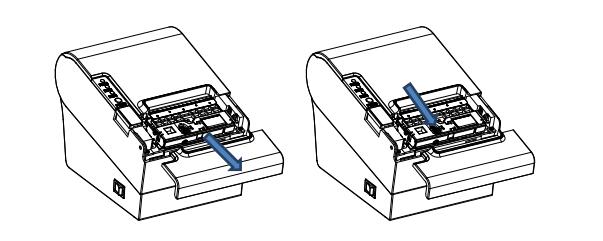
2. The method of clearing the card knife
When the printer stuck, you failed to open the upper cover of the printer. you could power off the printer and restart it. The position of the arrow on the right) until the upper cover can be opened normally, that is, to clear the stuck knife.
—–The article is reproduced on pos58 web.
 English
  Spanish
  Russian